Outputs & exports
Scenario Compare
Stress the deal — edit any non-base cell and read the spread against Base.
Scenarios (⌘0) puts scenarios side by side as columns and lets you stress a case by typing directly into it. Each column re-runs the full engine; the small red/green figures under each value are the spread vs Base.
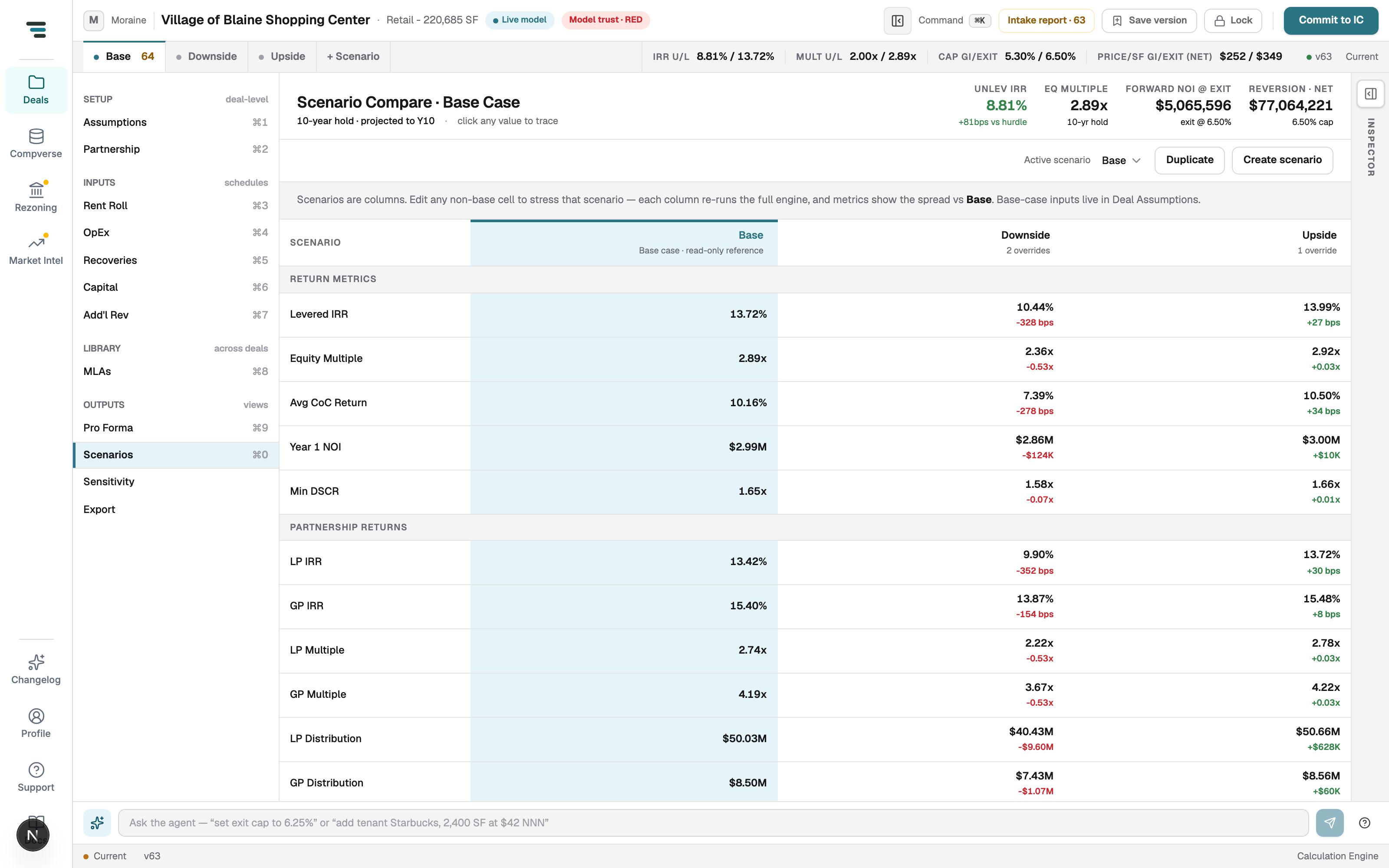
- Stress a case — click any cell in a non-base column and type. The column header counts its overrides.
- Base is read-only here — change Base on Assumptions and the whole grid re-reads it.
- Switch the live scenario — the Active scenario selector (or the scenario tabs at the top of the workspace); every other view shows the active scenario’s numbers.
- Add a case — Create scenario (blank) or Duplicate (copy the selected column, then stress it).
Rows cover return metrics (levered IRR, equity multiple, average cash-on-cash, Year 1 NOI, minimum DSCR) and — with the waterfall on — LP/GP returns, then the grouped assumptions each scenario can override.