Inputs & Library
Partnership & waterfall
Split returns between LP and GP with hurdle tiers, promote, and fees.
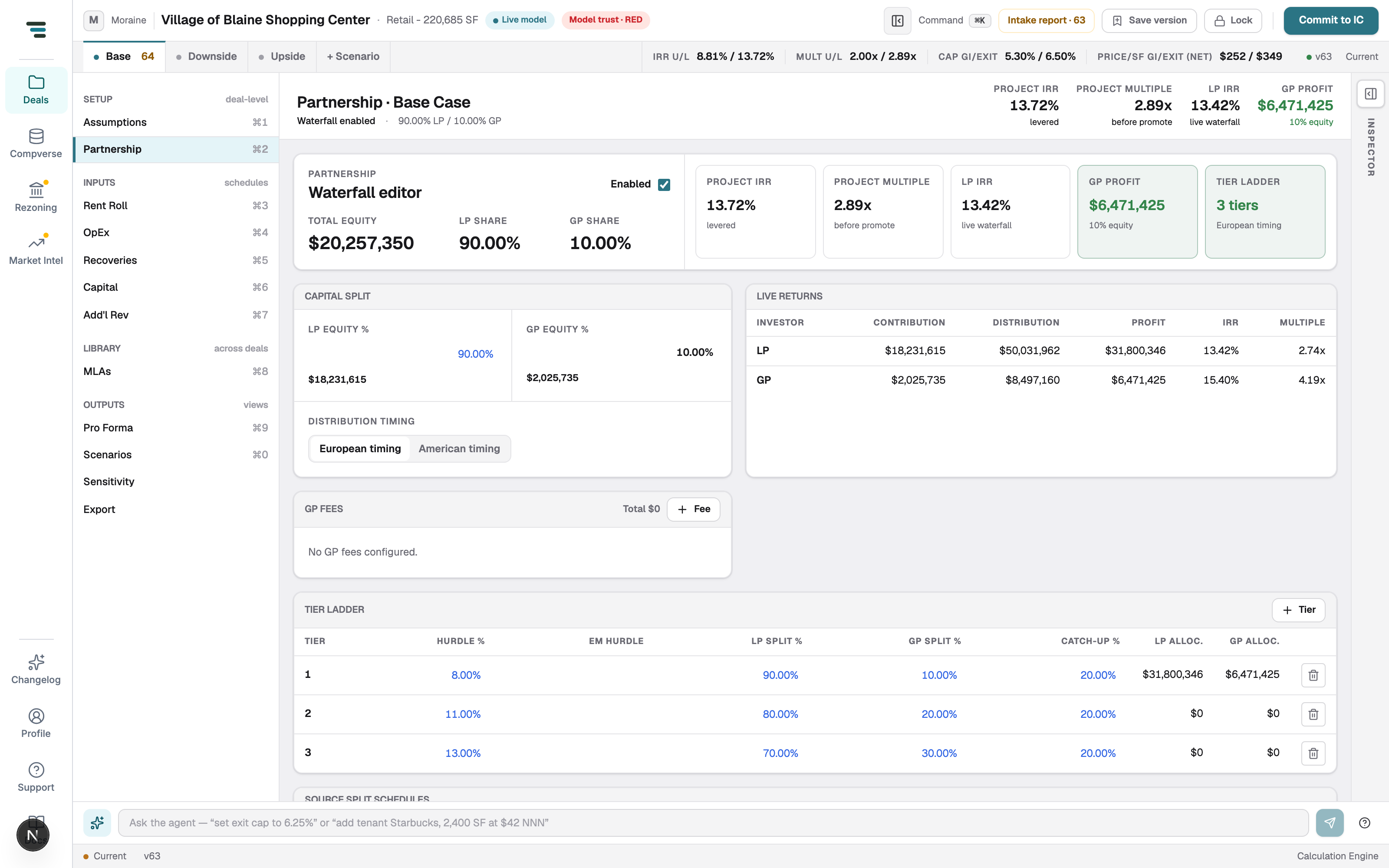
Partnership (⌘2) splits the deal’s cash flows between LP and GP. With the waterfall off, the model reports all-equity returns; switch it on and LP/GP metrics appear across the scenario bar, Scenario Compare, Sensitivity, and the workbook.
-
Tick Enabled on the Waterfall editor.
-
Set the Capital split — LP equity % and GP equity % (the dollar amounts compute from total equity).
-
Pick Distribution timing — European timing (return all capital first) or American timing (deal-by-deal promote).
-
Build the Tier ladder: each tier has a Hurdle % (IRR), optional EM hurdle, LP/GP splits above the hurdle, and a Catch-up %. + Tier appends; the allocation columns show each tier’s dollars live.
-
Add GP fees if the GP takes fees before the split (+ Fee).
Live returns shows contribution, distribution, profit, IRR, and multiple, per investor, recomputed on every edit. The header rail carries project IRR, project multiple, LP IRR, and GP profit.