In-depth reference
Recoveries — in depth
Every recovery method, pro-rata rule, expense pool, admin fee, and CAM cap the engine implements — with exact formulas and worked arithmetic.
Recoveries are where a lease’s rent multiplies. A tenant on Net (NNN) hands back its full share of operating expenses; a tenant on Base Year hands back only the growth above a frozen floor; a tenant on Gross hands back nothing. Get the treatment wrong on your two anchors and NOI moves by six figures before you have touched a rent number. This chapter is the complete reference for how Moraine’s engine turns an expense stack plus a per-tenant treatment into a reimbursement dollar — the exact formula for every method, how the pro-rata share is built, how expense pools and caps and admin fees stack, and where the sharp edges are.
Everything below describes the live calculation engine
(apps/web/lib/engine/reimbursement/). The UI never does recovery math — it
reads engine output and renders it. That one-way rule is why the number on the
screen and the number in an export always agree.
Overview: recovery is a per-tenant, per-month layer
Section titled “Overview: recovery is a per-tenant, per-month layer”The engine computes reimbursements one tenant, one recovery layer, one
month at a time, then sums months into the annual figures you see on the pro
forma. A tenant usually has a single primary layer (its
reimbursementConfig), but can carry additional layers — for example a
Fixed CAM floor stacked over a Net recovery on taxes and insurance.
Each layer is resolved independently and its monthly dollar added to the
tenant’s total.
Every layer runs through the same pipeline, in this order:
-
Eligible expense — start from the expense scope the layer recovers against (an expense pool, or the category totals), drop the categories this tenant doesn’t recover, then trim controllable growth to the CAM cap.
-
Tenant share — the tenant’s slice of that scope: an explicit numerator/denominator SF override if one was resolved from the rent roll, otherwise the tenant’s square footage over the area denominator.
-
Method — apply the recovery structure (Net, Base Year, Expense Stop, Fixed, Gross, or a pool allocation) to the tenant’s eligible share to get the pre-fee recovered amount.
-
Admin fee — add the CAM administrative fee, charged on the recovered base after any fee skips.
-
Proration — scale a partial first or last month by day count when the layer prorates by days.
The rest of this chapter walks each stage, gives the exact formula for every method, then works three deals end to end.
Stage 1 — eligible expense
Section titled “Stage 1 — eligible expense”The eligible expense is the pool of dollars this layer is allowed to reimburse against, before the tenant’s share is taken. Three things shape it.
Scope. If the layer names an expense pool
(recoveryPoolId), the eligible base is the sum of the grossed amounts of the
expense lines in that pool. If it names no pool, the base is the sum of the
grossed expense categories (Operating, Taxes, Insurance, Utilities,
Repairs, Management, Other). A pool takes precedence over category exclusions —
pool membership is the scope.
Doesn’t recover. Any category in the layer’s excluded set is dropped from the base. In the inspector this is the Recovers chip group — the categories you leave checked are recovered; unchecking one excludes it. Excluding Taxes from an otherwise-net tenant, for instance, turns a full NNN lease into “NNN-less-taxes” without changing the method.
CAM cap. If a controllable cap is in force, the base’s controllable portion is trimmed to the capped level (Stage 1c below). Non-controllable categories — by default Taxes and Management — pass through uncapped.
Two methods short-circuit this stage entirely: Gross and Fixed (SpecifiedAmount) carry no expense-based eligible amount, so their eligible expense is forced to zero. Gross recovers nothing; Fixed recovers a stated dollar independent of actual expenses.
Stage 1c — the CAM cap in detail
Section titled “Stage 1c — the CAM cap in detail”A controllable-expense cap limits how fast the controllable slice of the eligible base can grow year over year. Non-controllable categories are never capped. Which categories count as controllable is configurable per pool or per layer; when unspecified, everything except Taxes and Management is controllable.
The cap is defined by three fields — a rate (controllableCapPct, a decimal,
so 0.05 is 5%/yr), an optional controllable-category set, and an accrual
method (camCapMethod). The engine implements four accrual methods:
| Method | Cap formula | Behavior |
|---|---|---|
legacy (default) |
min(controllable, priorCapped × (1 + capRate)) |
Compounds off the prior realized (capped) controllable. Cumulative with no carryforward. This reproduces the engine’s original single-cap behavior exactly. |
compounding |
min(controllable, year1Actual × (1 + capRate)^yearsElapsed) |
Anchored to the first year’s actual controllable; ignores soft-year realizations. |
cumulative |
min(controllable, priorContractualCap × (1 + capRate) + bankedHeadroom) |
Unused cap headroom from soft years rolls forward as banked capacity. |
nonCumulative |
min(controllable, priorRealized × (1 + capRate)) |
Ratchets off the prior realized recovery, no carryforward. |
The first year a cap key is resolved is always the uncapped baseline — the cap starts biting in the second year. The year-over-year basis is keyed per fiscal month, so a January expense caps against last January’s capped January, and so on across the twelve fiscal months.
legacy and nonCumulative look similar — both ratchet off the prior capped
amount — but legacy is the historical default and is what an unconfigured cap
uses. Choose compounding when the lease caps against a fixed base-year actual;
choose cumulative when the lease banks unused headroom.
A single expense pool can be recovered under different caps by different tenants. Each distinct cap shape — its rate, its controllable-category set, and its accrual method — keeps an independent year-over-year basis, so a 3%-cap tenant and a 5%-cap tenant on the same pool never contaminate each other’s running cap.
Stage 2 — the pro-rata share
Section titled “Stage 2 — the pro-rata share”The tenant share is the fraction of the eligible base this tenant reimburses. There are two ways to arrive at it, and the first wins when present.
Explicit numerator / denominator. When the extraction resolves an explicit pro-rata share from the lease — a stated numerator SF over a rule-driven denominator SF — the engine uses it verbatim:
share = min(1, numeratorSF / denominatorSF)The denominator is the SF remaining after rule-driven exclusions, and the
engine records the resolution trail (for example, “GLA less Publix & OPs =
158,700 SF”) as an audit note on the line. An explicit share is used only when
denominatorSF > 0 and the numerator is a finite number; a non-positive or
malformed denominator falls back to the enum path so a bad round-trip never
bricks the run.
Area denominator (the enum path). With no explicit share, the tenant’s own square footage is divided by an area denominator:
share = min(1, leaseSize / denominator)where denominator is the total rentable area by default, or the
occupied area when the layer’s proRataDenominator is set to
occupiedArea. Total-area is the standard convention: a 10,000 SF tenant in a
100,000 SF building recovers 10%. Occupied-area concentrates the pool on
in-place tenants and is how a strict anchor/shop CAM structure allocates.
Both paths clamp to 100%. A lease size larger than the rentable area — from a unit mix-up or a mis-keyed figure — can never let one tenant recover more than the entire pool.
The tenant’s eligible share of expense is then simply:
tenantEligibleShare = eligibleExpense × shareEvery method below operates on tenantEligibleShare, not on the raw pool.
Stage 3 — method-by-method reference
Section titled “Stage 3 — method-by-method reference”The recovery structure is applied to the tenant’s eligible share. The engine’s canonical method vocabulary is richer than the treatment matrix’s short labels; the labels group several engine methods. Formulas below are stated at the annual level for readability — the engine runs them monthly (the stop amounts are the annual figure ÷ 12) and sums.
The tenant reimburses nothing.
recovery = 0Treatment label: Gross. The tenant’s expenses stay entirely landlord-borne.
Net (NNN)
Section titled “Net (NNN)”The tenant reimburses its full share of the eligible expense.
recovery = tenantEligibleShare = eligibleExpense × shareTreatment label: Net (NNN). This is the default and the most common structure — the tenant carries its pro-rata expenses in full. Exclude a category via Recovers to get “net less taxes,” etc.
Base Year
Section titled “Base Year”The tenant reimburses only the expense growth above a base-year floor. The floor is the tenant’s own share of the base-year expense.
recovery = max(0, tenantEligibleShare − baseYearStop)Treatment label: Base Year. The floor comes from one of two places:
- Explicit stop. A stated base-year dollar on the method is honored as the
annual stop (÷ 12 per month). A stop that exactly equals the base year
number — the classic “BY 2024” scraped as a
$2,024stop — is rejected as a mis-extraction and the tenant falls through to the auto-lock below. - Auto-locked stop. With no trusted explicit stop, the engine locks the floor to the tenant’s share of Year-1 grossed reimbursable expense, averaged across the tenant’s first twelve occupied months. In Year 1 the stop equals the Year-1 share, so a base-year tenant recovers $0 in the base year — exactly the classic behavior.
Two dated variants adjust the floor by inflation:
- Base Year +1 —
max(0, tenantEligibleShare − baseYearStop × (1 + inflation)). The base is grown one year forward, so the tenant recovers slightly less. - Base Year −1 —
max(0, tenantEligibleShare − baseYearStop / (1 + inflation)). The base is deflated one year, so the tenant recovers slightly more. If the inflation rate is a non-physical ≤ −100% (a bad extraction), the engine falls back to the plain base-year floor rather than dividing by zero.
Expense Stop
Section titled “Expense Stop”The tenant reimburses expense above a fixed dollar stop — like a base year, but the floor is a stated amount rather than a locked historical actual.
recovery = max(0, tenantEligibleShare − stop)Treatment label: Expense Stop (the engine’s BaseStop / MarketStop). The
stop’s basis matters:
$/SF— the stated stop is multiplied by the tenant’s size to get the annual stop (stop = stopAmount × leaseSize).$/year(default) — the stated stop is a flat annual total.
A $5.00/SF stop on a 20,000 SF tenant is a $100,000/yr floor; the tenant
reimburses its eligible share above that.
Fixed CAM
Section titled “Fixed CAM”The tenant pays a stated recovery amount unrelated to actual expenses.
recovery = fixedAmount × growthFactor (basis $/SF: × leaseSize)Treatment label: Fixed CAM (Fixed / SpecifiedAmount). The amount is
$/SF (multiplied by size) or a flat $/year total. An optional annual growth
rate compounds on each anniversary — a $4.00/SF fixed CAM growing 3%/yr. With
no growth configured the amount stays flat. Because it ignores the expense
stack, a Fixed CAM layer carries no eligible expense and is unaffected by pools,
caps, or exclusions.
A common structure is Fixed CAM + Net: a flat CAM charge stacked over a Net recovery on specific categories (say, taxes and insurance). Each leg is a separate layer with its own formula.
Pool Major / Pool Minor
Section titled “Pool Major / Pool Minor”These model an anchor/shop CAM split where major (anchor) tenants take a pro-rata slice of the pool and minor (shop) tenants split the residual.
majorAmount = min(pool × (size / totalArea), expenseCap × size) per majorminorPool = max(0, pool − Σ majorAmounts)minorAmount = min(minorPool × (size / minorArea), expenseCap × size) per minorMajors each take their area-pro-rata share of the pool, optionally capped at a
$/SF expenseCap. Whatever the majors leave behind is the minor pool, split
across minors by their area. Because minors absorb the entire unrecovered
balance — including the vacant space’s share — the pool recovery ratio pins to
1.0 even with vacancy. That is the intended residual-CAM semantics, but it
surprises anyone expecting generic pro-rata, so the engine raises a warning when
a minor tenant recovers while the property has vacancy.
Stage 4 — admin fees
Section titled “Stage 4 — admin fees”The CAM administrative fee is added on top of the recovered amount:
adminFeeAmount = adminFeeBase × adminFeePercentreimbursement = recoveredAmount + adminFeeAmountThe fee percent resolves per layer: a tenant-level Admin fee % wins; a value
of exactly 0 is a real “waived” override; only an unset value falls back to
the pool default, then to zero.
The admin fee base is the tenant’s recovered eligible expense — computed the same way as the recovery itself, so it inherits the cap and the method. For a Net tenant the base is the full eligible share; for a Base Year or Expense Stop tenant the base is the post-stop recovered amount, so admin is charged only on the dollars actually reimbursed, not on the whole expense.
Fee skips. Categories in the layer’s admin-fee exclusion set — the Fee skips chips — are removed from the admin base but stay in the recovery itself. The classic use is skip admin on taxes: the tenant reimburses taxes in full, but the landlord’s management markup is not charged on the tax line. Fee skips only shrink the admin base; they never change the recovered expense.
Stage 5 — proration
Section titled “Stage 5 — proration”When a layer prorates by days, a partial first or last month is scaled by the fraction of the month the lease is in place:
prorationFactor = overlapDays / daysInMonth (clamped to [0, 1])The overlap is the intersection of the lease’s occupancy window with the
calendar month, counted inclusively, so a lease commencing on the 16th of a
30-day month recovers 15 / 30 = 0.5 of that month’s line. Both the recovered
amount and the admin base are prorated. When the layer prorates by months or not
at all, the factor is 1. The final line is:
reimbursableAmount = max(0, recoveredAmount × prorationFactor + adminFeeBase × prorationFactor × adminFeePercent)Multi-layer recovery stacks
Section titled “Multi-layer recovery stacks”A tenant is not limited to one recovery structure. Beyond its primary
reimbursementConfig, a lease can carry additional recovery layers, each
with its own method, pool, admin fee, exclusions, cap, and pro-rata rule. The
engine resolves every layer independently and sums the monthly dollars into the
tenant’s reimbursement.
The canonical case is Fixed CAM + Net: a flat CAM charge (a Fixed layer, expense-independent) stacked over a Net recovery on a specific category set such as taxes and insurance. Because each leg is a distinct layer, the Fixed leg ignores the pool, cap, and exclusions entirely, while the Net leg recovers its categories in full — and the two produce separate audit lines that the Inspector shows stacked. Each additional layer also keeps its own base-year key, so a stack mixing a Fixed CAM and a Base Year leg locks and grows each floor independently.
Pool admin-fee basis
Section titled “Pool admin-fee basis”A pool can declare how its admin fee is charged via adminFeeBasis. On
eligible (the default), the admin fee is charged on the tenant’s own eligible
share — the same base the recovery itself uses, net of the tenant’s exclusions
and cap. On pool, the fee is charged on the capped pool base taken to the
tenant’s share, so the markup follows the same capped dollars the tenant
reimburses rather than an uncapped total. In both cases fee skips still remove
their categories from the base first. Use pool when the lease’s admin fee is
contractually a percentage of the whole CAM pool; use eligible — the common
case — when it tracks the tenant’s actual recovery.
Expense pools
Section titled “Expense pools”A recovery pool is a named bucket of expense lines that a set of tenants reimburses against together. Pool membership — the list of expense-line IDs — is the reimbursable base for any tenant assigned to that pool: the engine sums the grossed amounts of exactly those lines.
Most deals need a single definitional pool: all reimbursable OpEx. In the recoveries workspace this appears as a first-class, non-deletable row (the implicit All reimbursable OpEx bucket) that owns every reimbursable line no named pool has claimed — so the ledger’s cost column always partitions total reimbursable OpEx cleanly across the bucket plus any named pools, with no double-counting.
Add named pools only when different tenants genuinely reimburse against different expense sets — an anchor that reimburses only its own metered utilities, a shop set that reimburses CAM but not taxes. Tenants in the same pool can still carry different caps, fees, and exclusions; those live per-tenant in the treatment matrix, not on the pool.
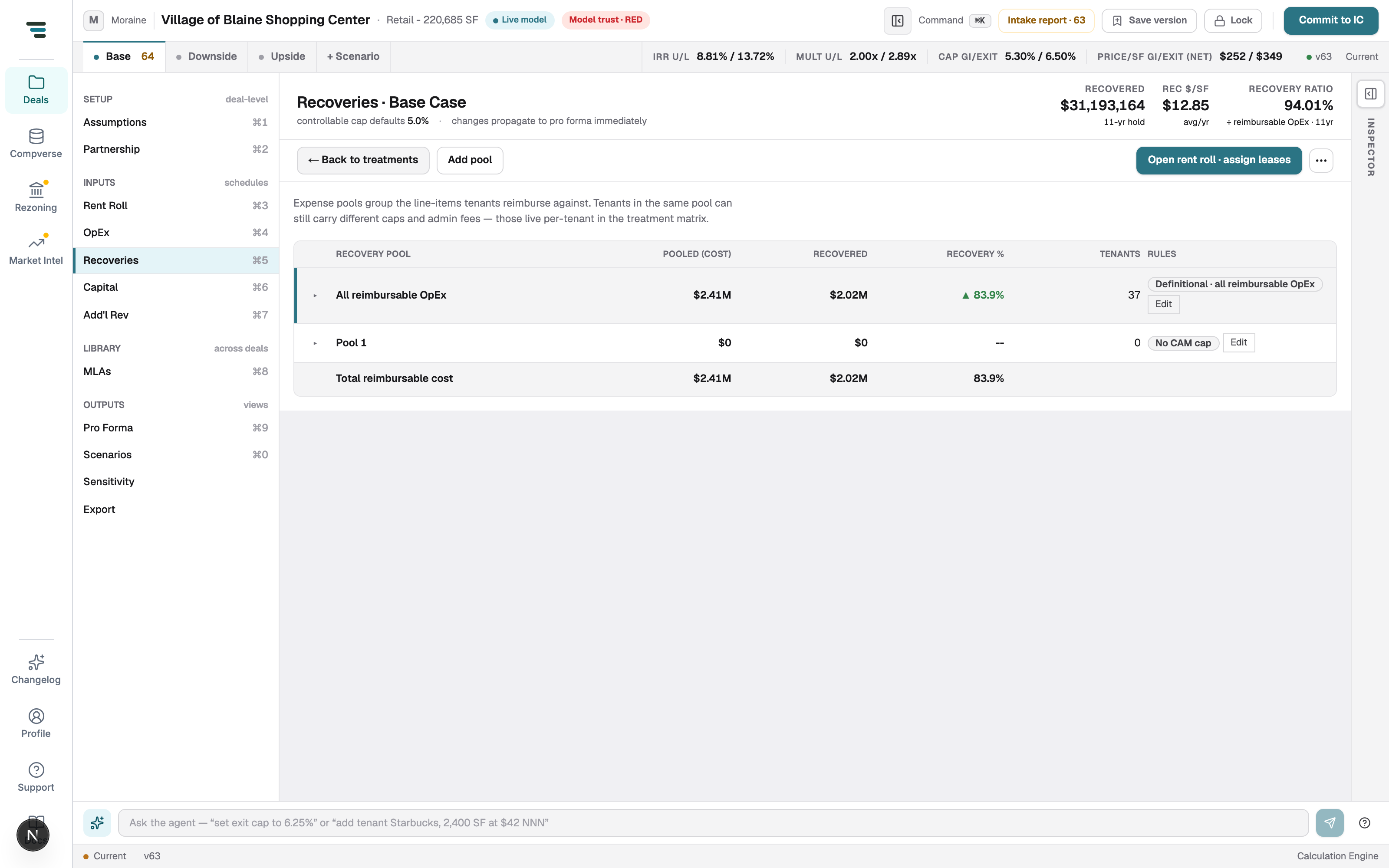
Two failure modes the engine guards:
- A pool whose expense IDs match zero live expense lines has a grossed base of $0 and therefore recovers $0 — silently, unless flagged. The compile step raises a warning for any pool matching no expense lines so this never passes unnoticed.
- A layer that references a pool ID not present in the deal raises a
MISSING_EXPENSE_POOLerror rather than recovering against nothing.
The treatment matrix
Section titled “The treatment matrix”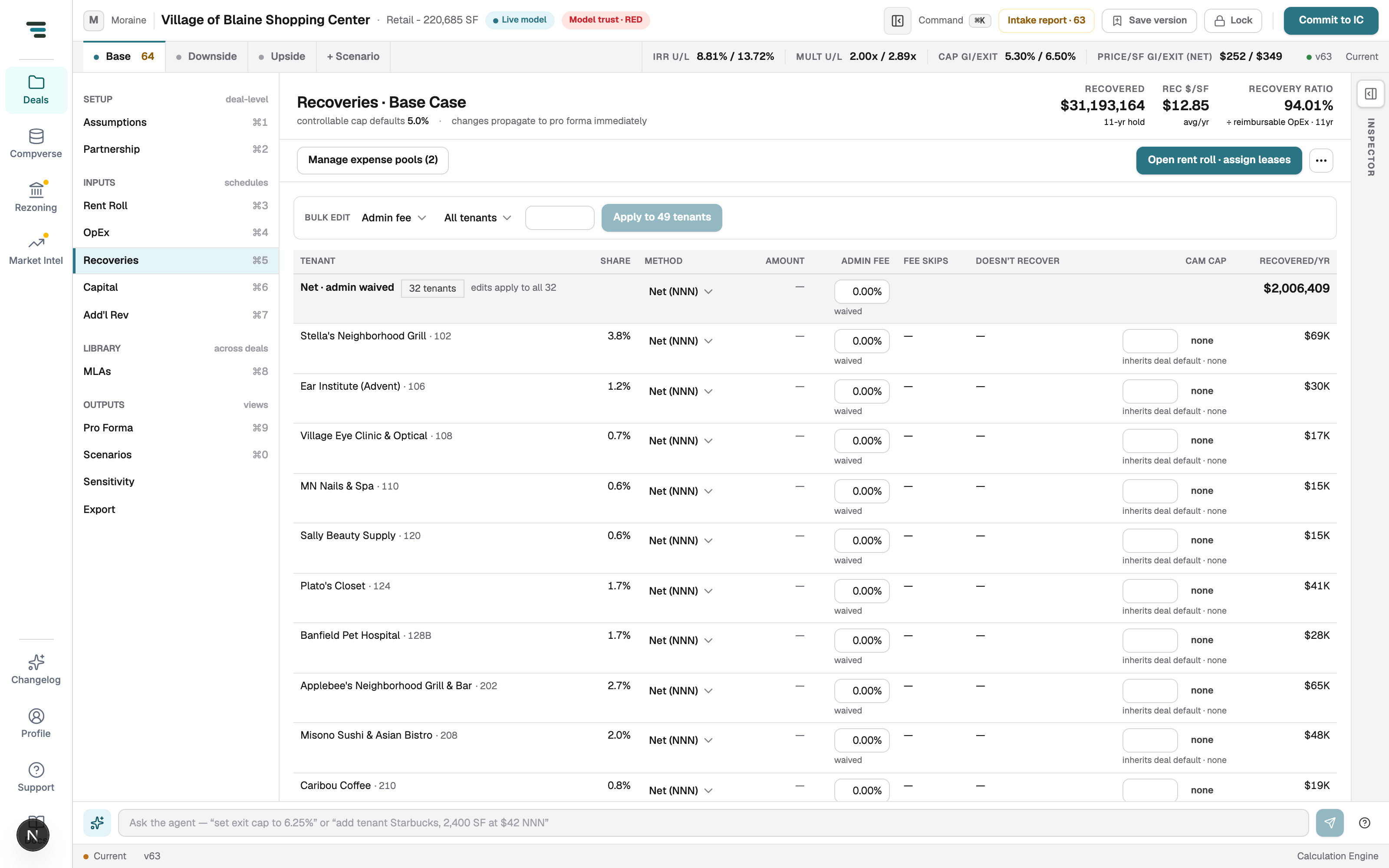
The matrix (⌘5) is one row per tenant: Method, fixed Amount where the method needs one, Admin fee %, CAM cap %/yr, the recovered categories (Recovers), Fee skips, and the resulting Recovered/yr. Tenants with identical terms roll up into a single band you edit once. The tri-state cells — Admin fee and CAM cap — show inherit (blank, take the pool default), a set value, or an explicit waived / no cap override.
Field reference
Section titled “Field reference”Per-layer (ReimbursementConfig)
Section titled “Per-layer (ReimbursementConfig)”| Field | Values | Effect |
|---|---|---|
method |
Gross, Net, BaseYear(+1/−1), BaseStop/MarketStop, Fixed, PoolMajor/PoolMinor | The recovery structure (Stage 3). |
recoveryPoolId |
pool ID | Scopes eligible expense to that pool; overrides category exclusions. |
excludedCategories |
expense categories | Categories the tenant doesn’t recover (the un-checked Recovers chips). |
proRataDenominator |
totalArea (default), occupiedArea |
Area denominator for the share. |
proRataMethod |
days, months, none |
Partial-month proration basis. |
proRataExplicit |
{ numeratorSF, denominatorSF, basisProvenance } |
Explicit share; overrides the denominator when denominatorSF > 0. |
adminFeePercent |
decimal, 0 = waived, unset = inherit |
CAM admin markup. |
adminFeeExcludedCategories |
expense categories | Fee skips — removed from the admin base only. |
controllableCapPct |
decimal, null = no cap, unset = inherit |
CAM cap rate. |
controllableCategories |
expense categories | Which categories the cap applies to. |
camCapMethod |
legacy, compounding, cumulative, nonCumulative |
Cap accrual method. |
Per-pool (RecoveryPool)
Section titled “Per-pool (RecoveryPool)”| Field | Values | Effect |
|---|---|---|
expenseIds |
expense-line IDs | The pool’s membership — the reimbursable base. |
controllableCapPct |
decimal / null |
Pool-default cap; a layer can override. |
controllableCategories |
expense categories | Pool-default controllable set. |
camCapMethod |
accrual method | Pool-default cap method (defaults legacy). |
adminFeePercent |
decimal / null |
Pool-default admin fee. |
adminFeeBasis |
pool, eligible |
Whether admin charges on the capped pool base or the tenant’s eligible share. |
Non-controllable categories default to Taxes and Management — a CAM cap never trims them.
Worked examples
Section titled “Worked examples”The engine computes monthly and sums. The arithmetic below is shown at the annual level; with expenses flat within a year, annual = monthly × 12, so the totals are identical.
Example A — Base Year with a CAM cap and admin fee
Section titled “Example A — Base Year with a CAM cap and admin fee”A 10,000 SF tenant in a 100,000 SF building (10% share, total-area
denominator). Method Base Year, admin fee 15%, controllable cap 5%/yr
(legacy) on a controllable pool. Base-year stop auto-locked.
Year 1 — controllable pool grossed expense $500,000; Year 1 is the uncapped cap baseline.
- Tenant eligible share = 500,000 × 10% = $50,000.
- Base-year stop auto-locks to the Year-1 share = $50,000.
- Recovery = max(0, 50,000 − 50,000) = $0. (Classic base year: zero in the base year.)
Year 2 — controllable expense grows 8% to a gross $540,000.
- CAM cap: capped controllable = min(540,000, priorCapped 500,000 × 1.05) = min(540,000, 525,000) = $525,000. The cap trims $15,000.
- Tenant eligible share = 525,000 × 10% = $52,500.
- Pre-fee recovery = max(0, 52,500 − 50,000) = $2,500.
- Admin fee base = the post-stop amount = $2,500; admin = 2,500 × 15% = $375.
- Total Year-2 recovery = 2,500 + 375 = $2,875.
The cap is doing real work: without it the Year-2 share would be 540,000 × 10% = $54,000 and the pre-fee recovery $4,000 — the 5% cap held the tenant’s growth recovery down by $1,500 of eligible expense.
Example B — Expense Stop
Section titled “Example B — Expense Stop”A 20,000 SF tenant in a 100,000 SF building (20% share). Method Expense
Stop, stop $8.00/SF ($/SF basis), no admin fee, no cap. Analysis-year
reimbursable OpEx grossed $1,000,000.
- Annual stop = 8.00 × 20,000 = $160,000.
- Tenant eligible share = 1,000,000 × 20% = $200,000.
- Recovery = max(0, 200,000 − 160,000) = $40,000.
The tenant carries the first $160,000 of its share; the landlord recovers everything above it.
Example C — Net with an admin fee and a fee skip
Section titled “Example C — Net with an admin fee and a fee skip”A 5,000 SF tenant in a 100,000 SF building (5% share). Method Net (NNN) on all reimbursable OpEx, admin fee 10%, Fee skips: Taxes. Analysis-year reimbursable OpEx grossed $1,200,000, of which Taxes = $300,000 and everything else $900,000.
- Tenant eligible share = 1,200,000 × 5% = $60,000.
- Net recovery = $60,000 (the tenant recovers its full share).
- Admin base excludes taxes: (1,200,000 − 300,000) × 5% = 900,000 × 5% = $45,000.
- Admin fee = 45,000 × 10% = $4,500.
- Total recovery = 60,000 + 4,500 = $64,500.
Without the tax fee skip the admin base would be the full $60,000 share and the fee $6,000 — the skip saved the tenant $1,500 of admin markup while leaving the recovered expense untouched.
Recovery ratio
Section titled “Recovery ratio”The headline recovery metric is the recovery ratio: recovered ÷ reimbursable operating expenses (ADR 0038). Over the hold, the recoveries hero aggregates it as:
recoveryRatio = Σ recovered / Σ reimbursable OpExlandlordBorne = max(0, reimbursableOpEx − recovered)Because the engine’s annual output does not break out reimbursable expense per year, the workspace estimates each year’s reimbursable expense as that year’s total operating expenses scaled by the portfolio reimbursable share (reimbursable expense ÷ total expense), and sums across the hold. A ratio near 1.0 on a fully-net rent roll is healthy; a low ratio signals base-year floors, caps, exclusions, or vacancy eating the recovery — and the landlord-borne dollar is the decision-relevant number the hero promotes.
How recoveries appear in the pro forma and per tenant
Section titled “How recoveries appear in the pro forma and per tenant”Each tenant’s monthly reimbursement lines sum into the year’s reimbursement revenue, which lands in effective gross revenue on the annual pro forma and flows into NOI. Per-tenant, each layer produces an audit line carrying the eligible expense, the capped vs uncapped base, the cap impact, the tenant share (with the explicit numerator/denominator SF and its provenance when an explicit share drove it), the stop amount, the pre-fee amount, the admin base, the admin amount, and the final reimbursable amount — plus notes naming the pool and any cap reduction. That line is what the Inspector and the vs-Broker view read when you trace a recovery number.
Edge cases & gotchas
Section titled “Edge cases & gotchas”- A pool matching zero expense lines recovers $0. The grossed base is empty, so every tenant on that pool recovers nothing — flagged at compile time, but worth checking first when a whole treatment reads zero.
- “Calendar year as the dollar stop.” A base-year stop equal to the base
year (e.g. a
$2,024stop for “BY 2024”) is rejected as a mis-extraction; the tenant falls through to the Year-1 auto-lock. If a base-year tenant is recovering nearly its full share (acting like NNN), suspect a bad stop. - Gross-up over an occupied-area denominator double-counts vacancy. Grossing expenses up to standard occupancy and dividing the pool by occupied area both neutralize vacancy, so together the in-place tenants can recover more than the actual expense deducted from NOI. The math is honored, but the engine warns — confirm only one of the two knobs is intended.
- Pool Minor absorbs the vacant space’s share. Minor (shop) tenants split the entire residual the majors leave, so the pool recovery ratio pins to 1.0 even with vacancy. Intended for anchor/shop CAM; the engine warns when it happens so it isn’t mistaken for pro-rata.
- Shares clamp to 100%. A lease size exceeding rentable area — or an explicit numerator exceeding its denominator — can never charge a tenant more than the full pool.
- Base Year −1 with a broken inflation rate. An inflation rate ≤ −100% would divide by zero; the engine falls back to a plain base-year floor, which is finite and conservative.
- Admin fee
0means waived, not inherit. A tenant admin fee of exactly zero is a real override that suppresses the pool default; leave the cell on inherit (blank) to take the pool’s fee.
Troubleshooting
Section titled “Troubleshooting”When a reimbursement disagrees with the OM, check in this order — it moves from the cheapest cause to the most subtle:
-
The tie-out on the intake report. Confirm the stated-vs-modeled recovery delta is actually out of tolerance before chasing it.
-
The tenant’s method. A Base Year read as Net, or an Expense Stop with a mis-scraped stop, moves the number the most.
-
The pool’s contents. An empty or wrong-membership pool recovers $0 or the wrong base. Verify the expense lines in the pool.
-
Admin fees and caps. A missing fee skip, a wrong cap rate, or an unexpected
legacyvscompoundingaccrual shifts the growth recovery. -
The vs-Broker view. It names the likely cause per line when the above doesn’t resolve it.
Related
Section titled “Related”- Recoveries — the workspace, bulk edits, and pool management.
- Operating expenses — the expense stack that feeds the reimbursable base.
- Annual pro forma — where reimbursement revenue lands in NOI.