Build a model
The intake report
Read the build's report card — census, tie-outs, and open items — and work it down to zero.
Every documents build ends here, with the model auditing itself against the sources it was built from. Nothing blocks you — Back to model works immediately — but the open-item count follows you (the top bar shows Intake report · N until you work it down).
How to read it
Section titled “How to read it”Top to bottom:
-
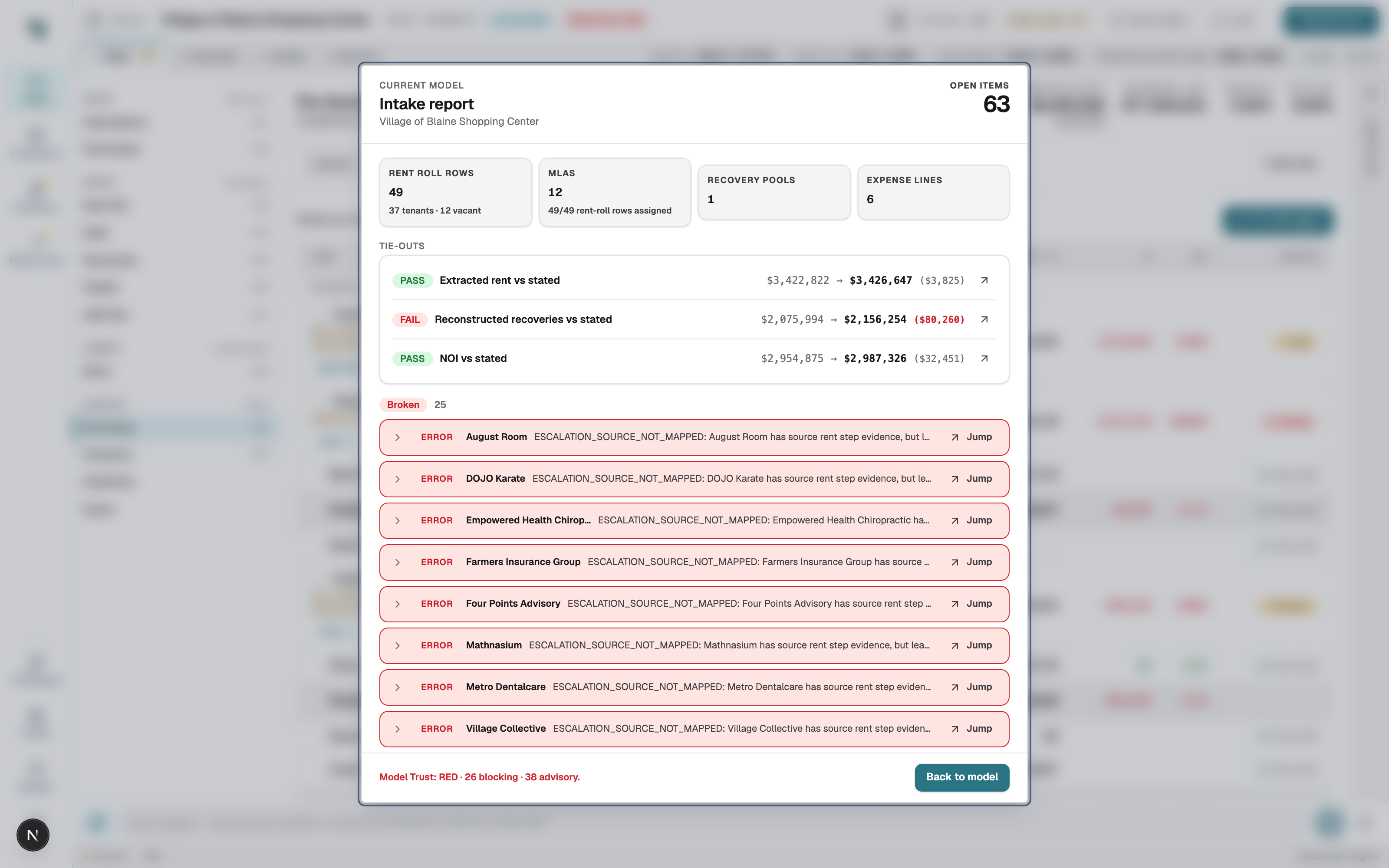
Census tiles — what extraction produced: rent roll rows (tenants + vacant), MLAs and how many rows they cover, recovery pools, expense lines. Sanity-check these against the document’s own counts first; a census that’s off means pages were missed, and no tie-out will save you.
-
Tie-outs — modeled vs stated, three of them: Extracted rent vs stated, Reconstructed recoveries vs stated, NOI vs stated. Each shows both figures and the delta; PASS means inside tolerance (under $1,000 or 2%), FAIL means go look. The ↗ on a row jumps to the view that explains it.
-
Open items — grouped by severity (Broken first). Each row names the tenant or line, says what evidence conflicted, and has a Jump link to the exact input. Work them here rather than hunting through the model.
The footer sums it up as Model Trust: RED/AMBER/GREEN · N blocking · N advisory — the same state the workspace shows as the Model trust chip.
Work it down
Section titled “Work it down”-
Fix census problems first (missed pages, wrong document picked) — that means rebuilding from better sources, not editing the model.
-
Then Jump through the Broken list. Most items are one decision each: confirm a rent step, pick the right MLA, accept a default.
-
Re-check the tie-outs as you go — they recompute with every edit, like everything else.
Come back any time
Section titled “Come back any time”Click Intake report · N in the workspace top bar. The report always reflects the current model, not a snapshot from build time.