In-depth reference
Rent roll & leases — in depth
Every rent-roll column and lease field, how each one feeds the cash flow, and what the engine does at rollover — with worked numbers.
The rent roll is the tenancy model: one row per lease or vacant suite, and behind each row the full lease record the engine reads to build monthly cash flow. This page is the complete reference — every visible column, every lease field, and the exact arithmetic that turns a contract into scheduled base rental income and, at expiration, into a rollover. Read Rent Roll first for the quick tour; this page is the deep version you reach for when a number needs defending.
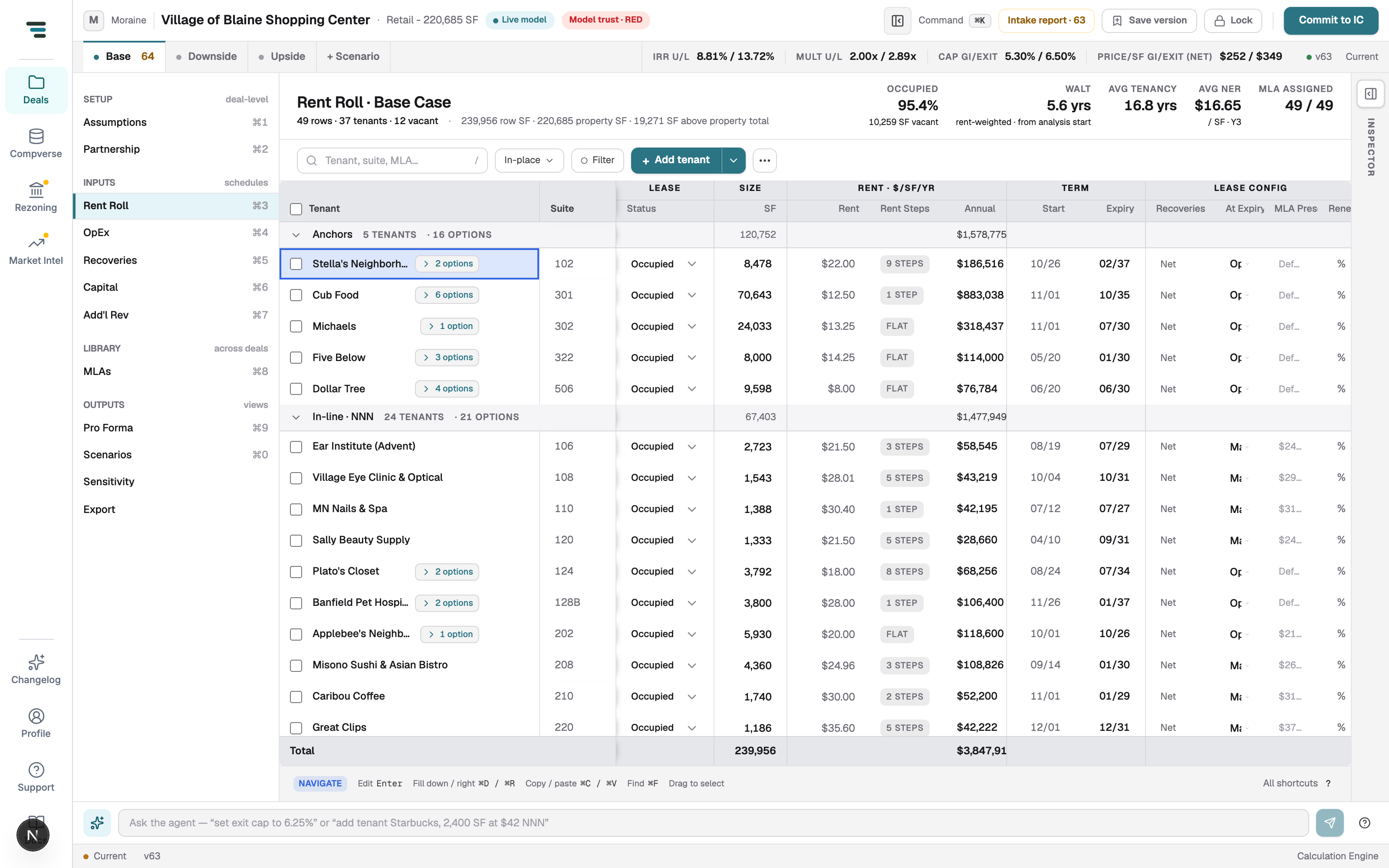
How a row becomes cash flow
Section titled “How a row becomes cash flow”Every row resolves to a TenantLease. The engine walks the analysis month by
month and, for each lease in each month, decides a lease state — LEASED,
VACANT, or (after a rollover) a Blended re-lease — then computes a rent
stack for the leased months. Three ideas govern everything below:
- Contract rent runs during the stated term. Base rent, step rents, CPI escalation, abatements, and retail overage stack up while the lease is in its own term. Outside the term the rent stack is zero.
- Market behavior takes over at rollover. When a lease reaches its expiration, the space re-leases under the tenant’s assigned Market Leasing Assumption (MLA) — a renewal-probability-weighted blend of New and Renewal economics — unless a contractual option or a hard disposition (Vacate, Reconfigured) intervenes.
- A vacant suite has no income until it is leased up. Its path to rent is its assigned MLA’s market rent plus downtime and make-ready costs. A vacant row with no MLA and no explicit lease-up rent models $0 forever.
The grid, column by column
Section titled “The grid, column by column”The grid is spreadsheet-like: click a cell and press Enter or start typing. Tenant · Suite is frozen-left and always visible; the four secondary columns (%, Unit, Monthly, Term · Mo) are off by default and toggled from the Columns menu. Visibility, widths, density, and saved Views persist per browser.
| Column (header) | Group | What it is | Units / format | Editable | Effect on the model |
|---|---|---|---|---|---|
| Tenant · Suite | — | Tenant name, suite, a status select, and badges, on one line | text · text · select | Yes (name, suite, status inline) | Identity only; status sets the lease type (below) |
| SF | Size | Rentable area of the lease | integer SF | Yes | Multiplies per-SF rents and recoveries; drives % and pool shares |
| % | Size | Share of building area | percent, 1 dp | No (computed) | Display; SF ÷ total rentable area |
| Rent | Rent · $/sf/yr | Headline base rent, with a schedule chip (“Flat”, “3 steps”, “4.0% annual”) | number in the row’s unit | Yes | Sets in-place base rent; the chip opens the rent-schedule editor |
| Unit | Rent · $/sf/yr | Rent basis for the Rent cell | $/SF/year, $/SF/mo, $/mo, $/yr |
Yes | Determines how Rent annualizes (see formulas) |
| Annual | Rent · $/sf/yr | Annualized in-place rent | whole dollars | No (computed) | The Year-1-basis headline; totals footer sums it |
| Monthly | Rent · $/sf/yr | Annual ÷ 12 | whole dollars | No (computed) | Display; also shown in the Annual cell’s hover when this column is hidden |
| Start | Term | Lease commencement (lease-up start for vacant rows) | MM/YY |
Yes | Left edge of the term; anchors term ↔ expiry sync |
| Term · Mo | Term | Stated term length | integer months | Yes | Editing it re-derives Expiry from Start |
| Expiry | Term | Lease expiration | MM/YY |
Yes | Right edge of the term; the rollover trigger date |
| Reimb Pool | Lease config | Recovery summary, e.g. “Net · CAM + Tax + Ins · 5% admin” | text | Opens the recovery inspector | The full per-lease recovery config; see Recoveries |
| Expiration | Lease config | What happens at expiry | Market · Renew · Vacate · Option · Reconfigured |
Yes | Selects the rollover path (below) |
| MLA Preset | Lease config | Assigned Market Leasing Assumption, or “Market default” | text | Opens the MLA inspector | The rollover terms the lease uses; see MLA Profiles |
| Renewal % | Lease config | Per-lease renewal-probability override | percent | Yes | Overrides the MLA’s renewal probability in the blend; blank = inherit |
The Tenant · Suite status select maps to the lease type: Occupied
(Existing), New lease (New), and Vacant (Available). A vacant row
renders its name as Vacant, groups under Vacant, and exposes a lease-up
sub-row.
Rows group automatically. A lease of 8,000 SF or more, or one whose in-place
annual rent is $250,000 or more, groups under Anchors and earns an
ANCHOR badge. A lease whose recovery method reads as gross groups under
In-line · Modified Gross; everything else with recoveries groups under
In-line · NNN. Vacant suites group under Vacant. Other badges: + OPTION
(the lease carries contractual options), + SOURCE OPTIONS (option language was
captured from the source but not modeled), and CAP N% (a CPI cap is set).
The Total footer sums SF, Annual, and Monthly; each group header row shows its own SF, %, and annual subtotals. Group subtotals and the grand total exclude option-term display rows, since those represent the same space in a later period.
Editing in the grid
Section titled “Editing in the grid”-
Point edits. Click any editable cell and type. Number cells commit on blur or Enter; date cells accept
MM/YYand re-parse on blur. -
Term ↔ expiry sync. Editing Term · Mo re-derives Expiry from Start; editing Start or Expiry keeps the other consistent. The three fields never drift apart.
-
Rent schedule. The chip on the Rent cell opens the rent-schedule editor — Fixed steps, Indexed (CPI) escalation, or Annual escalation %. Only one growth method is active at a time: setting an annual escalator above zero clears fixed steps and CPI.
-
Recovery and MLA. The Reimb Pool and MLA Preset cells open their editors in the right-hand inspector rail. Assignment and market-rent selection live there.
-
Grid mode. Toggle Grid on for spreadsheet interaction: arrow-key navigation, range select, Excel-compatible copy/paste as TSV, and fill. See Keyboard shortcuts for the full chord list; the grid’s own footer surfaces Enter to edit, ⌘D/⌘R fill, ⌘C/⌘V copy/paste, and ⌘F find.
Bulk actions appear when rows are selected in grid mode: Bump rent %, At expiry… (set the rollover treatment across the selection), Copy (with headers), and Delete. + Add tenant appends a vacant suite by default; the caret offers Vacant suite (modeled as lease-up) or Occupied tenant (in place). Build from document reconciles an attached rent roll into a reviewable changeset. Paste from Excel and Copy as TSV live under the ⋯ menu alongside Row density.
The lease record
Section titled “The lease record”Each row is backed by a lease with the following fields. These are the values the engine actually reads; the grid surfaces the common ones and the inspector rail the rest.
| Field | What it is | Values / units | Default | Effect on the model |
|---|---|---|---|---|
tenantName, suite |
Identity | text | — | Labeling and grouping |
leaseType |
Lease kind | Existing, Renewal, New, Available |
Existing |
Available = vacant/lease-up; others are in-place term leases |
size |
Rentable area | number + areaUnit (SF/SM/Units) |
— | Scales per-area rent and recoveries |
startDate, expirationDate |
Term bounds | dates | — | The LEASED window; expiration is the rollover trigger |
baseRent + baseRentUnit |
Contract base rent | $/SF/year, $/SF/month, $/year, $/month |
— | The base layer of the rent stack |
stepRents[] |
Scheduled bumps | { effectiveDate, amount, percentIncrease? } |
none | Absolute or percentage steps within the term |
cpiConfig |
Index escalation | method, rate, floor?, cap?, compounding | none | Annual CPI increment on top of base + steps |
abatements[] |
Free rent | { startMonth, durationMonths, amount, components? } |
none | Reduces scheduled rent over the specified months |
retailSales |
Percentage rent | sales volume, overage %, breakpoint, type, reporting lag | none | Overage rent above the breakpoint (retail) |
reimbursementConfig |
Primary recovery | method + pool, admin fee, exclusions, cap | required | How the tenant reimburses operating expenses |
additionalRecoveries[] |
Stacked recoveries | array of recovery configs | none | Extra recovery layers (e.g. separate tax pass-through) |
uponExpiration |
Rollover treatment | Market, Renew, Vacate, Option, Reconfigured |
— | Selects the post-expiration path |
optionTerms, subsequentOptionTerms[] |
Contractual options | term, rent basis, rent, LC, steps, CPI | none | Exercised in sequence when uponExpiration = Option |
optionUponExpiration |
After the last option | Market, Renew, Vacate, Reconfigured |
Market |
Treatment once all option terms are exhausted |
renewalProbability |
Per-lease renewal weight | fraction 0–1 (shown as %) | inherits MLA | The blend weight p at rollover |
marketLeasingAssumptionId |
Assigned MLA | id | none → “Market default” | The rollover terms; unassigned space stays dark |
leasingCosts |
Make-ready | TI, LC, in-month | none | TI/LC capital at commencement |
sourceOptionFacts[] |
Captured option language | type, terms, dates | none | Reference only; earns the + SOURCE OPTIONS badge |
Base rent and units
Section titled “Base rent and units”Base rent converts to a monthly figure by unit:
$/SF/year→baseRent × size ÷ 12$/SF/month→baseRent × size$/year→baseRent ÷ 12$/month→baseRent
The Annual column is the monthly figure × 12 (equivalently, $/SF/year ×
size). Per-suite units ($/year, $/month) are size-independent, which is why
they survive a 0-SF row — the path a ground or pad lease takes.
Step rents and escalations
Section titled “Step rents and escalations”The rent-schedule editor offers three mutually exclusive growth methods:
- Fixed steps — a
stepRents[]schedule. Each step with an effective date on or before the current month applies, in date order. A step withpercentIncreasemultiplies the running rent by(1 + percentIncrease); a step withamountreplaces it with that stated rent (converted from the step’s unit). The engine reports step rent as the increment above base, so base + step is the current contract rent. - Indexed (CPI) — a
cpiConfig. The escalation fires once per period: on the lease anniversary month whenmethodis LeaseYear, or in January when CalendarYear. At each trigger the rate is clamped to[floor, cap]and an increment is added. Between triggers the accumulated CPI carries forward unchanged. - Annual % — a single fixed escalator. Setting it above zero clears any fixed steps and CPI (one growth method at a time).
CPI compounding matters. With compound (the default) each trigger applies
the rate to base + step + accumulated CPI, so the index grows on the growing
rent. With baseOnly the rate always applies to base + step, giving a linear
escalation off the contract base. Floor and cap clamp the effective rate before
the increment is taken.
Abatements and percentage rent
Section titled “Abatements and percentage rent”Abatements (abatements[]) model free rent. Each entry has a startMonth, a
durationMonths, and an amount — either a fixed dollar figure or a { percent }
(1 = 100% free). An optional components list (base, step, cpi) restricts
which rent layers the abatement waives; omitted, it applies to the full scheduled
rent. In the vacant lease-up sub-row, the Free rent, mo field writes a single
100%-abatement entry from month 1. Abatements reduce scheduled base rental over
their window and never carry beyond it.
Percentage (overage) rent comes from retailSales: an annual sales volume, an
overage percentage, a breakpoint (natural or artificial), and an optional
reporting-lag in months. The engine charges overage rent on sales above the
breakpoint, projected by analysis year. It stacks on top of contract rent for
retail tenants and is zero when no retailSales config is present.
The rent stack
Section titled “The rent stack”For each leased month, the engine assembles the rent stack in monthly dollars:
scheduled base rental = base rent + step rent + CPI increment + abatementswhere step rent is the increment above base, the CPI increment is the accumulated index escalation, and abatements are negative. Retail overage rent is tracked separately and added for retail tenants. Outside the lease’s own term — before commencement, in a rollover downtime gap, or after a Reconfigured expiration — the entire stack is zero.
Renewal options (contractual)
Section titled “Renewal options (contractual)”Set Expiration to Option to model contractual renewal/extension options rather than a market rollover. Option terms render as indented rows beneath the tenant, marked excl. totals because they are the same space in a later period.
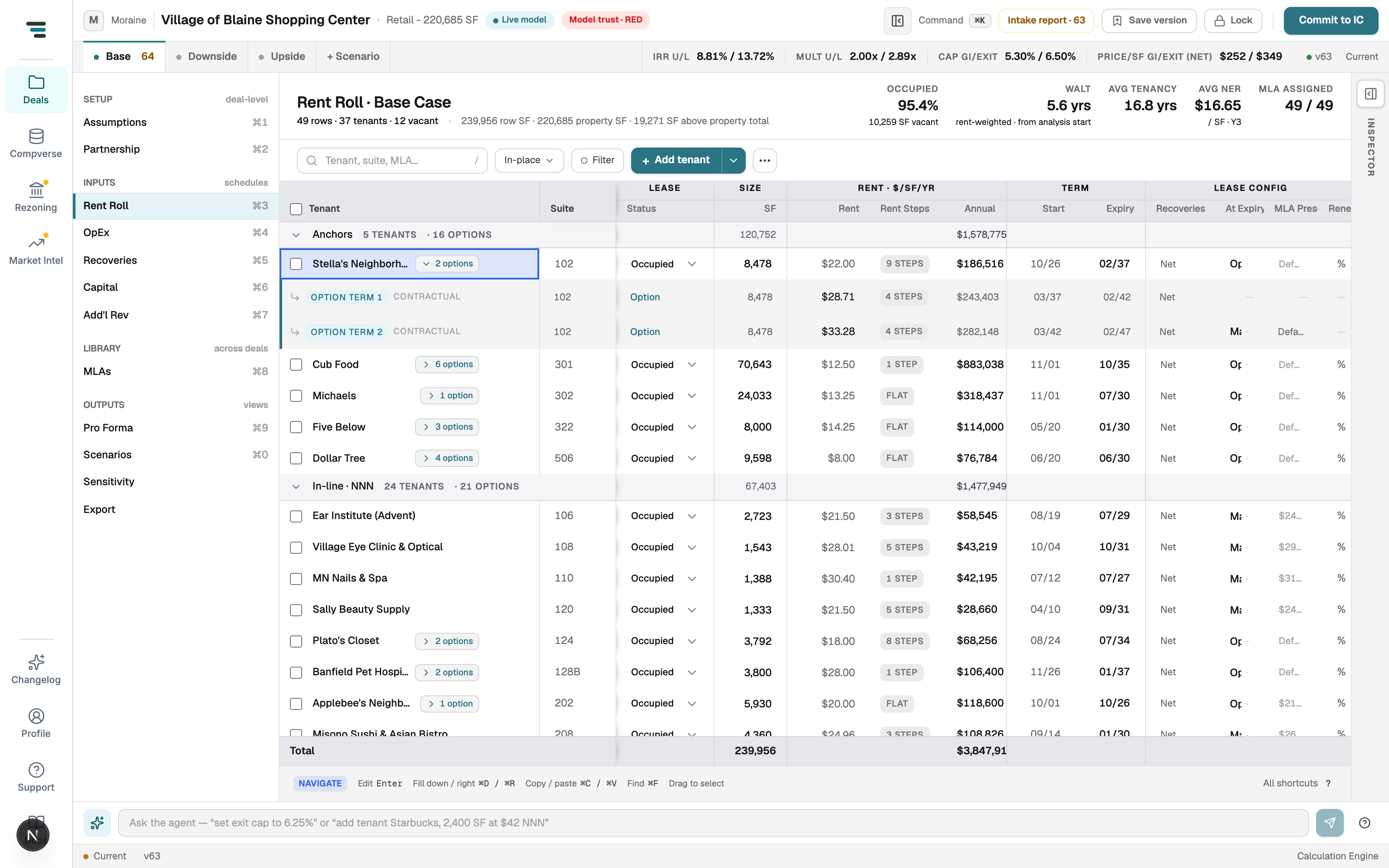
Each option term carries:
termMonths— its length.rentBasis— fixed or market. A fixed option prices at its statedbaseRent/baseRentUnit. A market option grows the assigned MLA’s new market rent to the option’s commencement date, then multiplies bymarketRentPercent(e.g. 95% of market). The grid shows “% of Mkt” and “Market” for these, since the dollar rent is only known at commencement.- Optional step rents, CPI config, and a term-specific leasing commission (otherwise the MLA renewal LC is inherited).
Options exercise at 100% probability with no vacancy gap: Option 1 begins the
first of the month after the lease expires; each subsequent term begins the month
after the prior ends. After the final option term, the space rolls over per
optionUponExpiration (default Market), re-leasing under the lease’s own
MLA — so the post-option period matches the pre-option MLA.
Recovery configuration per lease
Section titled “Recovery configuration per lease”The Reimb Pool cell summarizes the lease’s recovery structure; the recovery
inspector holds the full config. A lease’s primary reimbursementConfig picks a
method and a recovery pool, and may add an admin fee, excluded expense
categories, a controllable-expense cap, and an explicit pro-rata share.
Additional pass-throughs stack as additionalRecoveries[] layers. The canonical
methods are Gross, Net, Base Year (and Base Year +1 / Base Year
-1), Base Stop, Fixed, Pool Minor, and Pool Major. (A special
Continue prior marker exists only inside MLA rollover terms — it tells the
re-leased space to keep the departing tenant’s recovery structure.) The full
treatment reference — pools, admin fees, caps, and the recovery ratio — lives in
Recoveries.
MLA assignment and market-rent selection
Section titled “MLA assignment and market-rent selection”Every lease that can roll to market needs an assigned MLA. The MLA Preset cell shows the assignment (or Market default when none is set) and opens the MLA profile in the inspector. The MLA supplies the market rent, renewal probability, downtime, TI/LC, abatements, and term the space uses at rollover; its full field set is documented on MLA Profiles.
The grid also surfaces mark-to-market: it compares the lease’s in-place base
rent against the assigned MLA’s quoted new market rent, both on a $/SF/year
basis. A negative delta means the lease is below market (rollover upside);
positive means above. The comparison uses the MLA’s quoted (un-inflated) new
market rent, so it is a snapshot at the analysis start, not the grown rent the
engine actually re-leases at.
The Renewal % column overrides the MLA’s renewal probability for that lease only; left blank, it inherits the MLA’s value (the placeholder shows the inherited figure, defaulting to 75% when the MLA carries none).
Trust and review states on extracted values
Section titled “Trust and review states on extracted values”Values that arrive from a source document carry a trust state, and the grid keeps review items visible until you resolve them. The canonical states — used identically here, on the intake report, and in exports — are:
- Mapped — read from a source document, with the document, page, and quote in its source proof.
- Inferred — derived from other values, not stated by any document.
- Defaulted — the source was silent and a house default filled the gap; it stays an open review item until you confirm it.
- Missing — nothing found and no default applies; the value needs you.
- Reviewed — a flagged item you accepted.
- Overridden — a computed value you replaced by hand.
- Reconciled — a stated-vs-modeled line within tolerance (under $1,000 or 2%), or one you accepted.
The rent roll surfaces these in three places. A lease whose base rent has no captured source lineage reads as source-missing rather than captured. A row with a data-quality problem shows a red corner triangle on the Tenant cell, and the status bar tallies “N tenants need attention”. MLA assignment gets its own review lane: a lease can be flagged Missing MLA, Missing profile (a dangling id), Fallback MLA, or Ambiguous MLA, and the banner “N MLA assignment needs review” appears with a Show MLA issues only filter to work the list down. See the Glossary for the full trust-state definitions and Inspect the model for how to trace a value back to its source.
What happens at expiration
Section titled “What happens at expiration”At the month after a lease expires, the engine chooses a path from
uponExpiration:
- Market — re-lease under the assigned MLA at the blended (New/Renewal) economics, using the lease’s own renewal probability (or the MLA’s).
- Renew — force a pure renewal: renewal probability p = 1.
- Vacate — force a pure new-lease roll: p = 0 (full new-lease downtime).
- Option — exercise contractual option terms in sequence (above).
- Reconfigured — the space goes permanently dark after expiration (no re-lease).
If a lease reaches expiration with no resolvable MLA and no option, the space stays vacant for the rest of the hold. This is silent at the engine level; the warning is raised statically and surfaced in the workspace as an MLA-assignment review item (“N MLA assignment needs review”) and on the intake report.
The MLA blend
Section titled “The MLA blend”For a Market/Renew/Vacate rollover the engine builds a blended re-lease. With renewal probability p (clamped to 0–1), each economic term is the probability-weighted average of the MLA’s Renewal and New values:
blended rent (per SF) = p × renewalRent + (1 − p) × newRentblended downtime (mo) = floor((1 − p) × monthsVacantNew)blended term (mo) = round(p × termRenewal + (1 − p) × termNew)blended TI (per SF) = p × tiRenewal + (1 − p) × tiNewblended LC (per SF) = p × lcRenewal + (1 − p) × lcNewThe new market rent is grown from the analysis start to the re-lease commencement date at the MLA’s market-rent inflation:
newRent = MLA new market rent × (1 + marketRentInflation) ^ (monthsToCommencement ÷ 12)where monthsToCommencement counts from the analysis start to the month the
blended lease actually commences — i.e. the month after expiration plus the
blended downtime. The renewal rent is either a stated rent or a percent of
that grown new rent. The blended lease then commences after the downtime gap,
runs for the blended term, and — when it in turn expires — rolls over again under
the same MLA. During the downtime gap the space contributes absorption/turnover
vacancy, not rent.
Worked example 1 — steps through expiration, then an MLA rollover
Section titled “Worked example 1 — steps through expiration, then an MLA rollover”Ridgeline Outfitters, suite 120, 5,000 SF, base rent $30.00 /SF/year, five-year term Jan 2026 – Dec 2030, on a 10-year hold from Jan 2026.
Rent steps: to $33.00 at the start of year 3 (Jan 2028) and $36.00 at the start of year 5 (Jan 2030). Expiration = Market. Assigned MLA “Retail Inline”: new market rent $40.00 /SF/year, renewal rent 90% of market, renewal probability 70%, downtime 9 months new / 2 renewal, term 60 / 60, TI $25 new / $8 renewal, market-rent inflation 3%.
In-place rent. Base monthly = 30 × 5,000 ÷ 12 = $12,500/mo, $150,000 Year 1. After the first step: 33 × 5,000 = $165,000; after the second: 36 × 5,000 = $180,000. The mark-to-market cell shows the delta against the MLA’s quoted rent: 30 − 40 = −$10.00 /SF, i.e. below market.
At rollover (Jan 2031). With p = 0.70:
- Blended downtime = floor(0.7 × 2 + 0.3 × 9) = floor(4.1) = 4 months. The blend commences May 2031; Jan–Apr 2031 are absorption vacancy.
- Months from analysis start (Jan 2026) to commencement (May 2031) = 64. Growth factor = 1.03^(64÷12) = 1.03^5.333 ≈ 1.1707.
- New market rent = 40 × 1.1707 = $46.83 /SF. Renewal rent = 0.90 × 46.83 = $42.15 /SF.
- Blended rent = 0.7 × 42.15 + 0.3 × 46.83 = $43.55 /SF → $217,760 annual (≈ $18,147/mo).
- Blended term = round(0.7 × 60 + 0.3 × 60) = 60 months → the re-lease runs May 2031 – Apr 2036.
- Blended TI = 0.7 × 8 + 0.3 × 25 = $13.10 /SF = $65,500 of tenant- improvement capital at commencement, plus the blended leasing commission.
So the tenant’s contract rent climbs $150k → $165k → $180k through 2030, the suite goes dark for four months in early 2031, then re-leases at ~$43.55/SF and escalates again under the MLA at its next rollover.
Worked example 2 — a vacant suite leased up
Section titled “Worked example 2 — a vacant suite leased up”Suite 250, Vacant, 3,000 SF, no in-place rent. Assigned MLA “Retail Inline” (new market rent $40.00 /SF/year, downtime 9 months, TI $25 /SF). Lease-up settings on the sub-row: 3 months free rent, LC 6% of total rent.
- Display rent. With no explicit lease-up rent, the row shows the MLA’s market rent — $40.00 /SF — converted to the row’s unit. At full occupancy that is 40 × 3,000 = $120,000 annual.
- Absorption. The suite contributes absorption/turnover vacancy (no rent) until it commences, then collects rent net of the 3 free-rent months from its start.
- Make-ready capital. TI = 25 × 3,000 = $75,000; the leasing commission is 6% of the total lease rent. Both hit as capital at commencement.
Set an explicit lease-up rent to override the MLA market rent; leave it blank and the MLA governs.
Edge cases and gotchas
Section titled “Edge cases and gotchas”- 0-SF rows (ground / pad leases). Per-SF rent collapses to $0 on a 0-SF
lease, so use a per-suite unit (
$/yearor$/month). The engine carries an absolute annual total for these, including at rollover when the MLA’s market rent is quoted per suite. - Mark-to-market is a snapshot. The below/above market delta uses the MLA’s un-inflated new market rent against the current in-place base rent — not the stepped rent at expiry, and not the grown rent the engine re-leases at. It tells you the gap today, not the exact rollover rent.
- Options versus market rollover. With Expiration = Option, the market
blend does not run until the options are exhausted; the post-option treatment
(
optionUponExpiration, default Market) then re-leases under the lease’s MLA. A market-basis option needs an assigned MLA to price; without one it falls through to a market rollover. - One growth method at a time. A fixed Annual % escalator clears fixed steps and CPI. If a lease legitimately has both scheduled steps and CPI, model it with fixed steps plus a CPI config — not the annual-% shortcut.
- CPI compounding.
compoundgrows the index on accumulated CPI;baseOnlykeeps it linear on base + step. A lease abstracted as “CPI, uncapped” defaults to compound — set a cap if the lease caps annual increases. - Renewal probability precedence. The blend weight is the per-lease Renewal % override if set, else the lease’s stored probability, else the MLA’s, else 0. Renew and Vacate dispositions hard-set it to 1 and 0.
- Option rows and totals. Option-term rows are excluded from SF, occupancy, in-place rent, and the totals footer — they are the same space in a later period. Don’t read a suite’s SF twice off the grid.
- Reconfigured is permanent. Choosing Reconfigured sends the space dark after expiration with no re-lease. Use it for space you intend to demolish or repurpose, not for a slow lease-up.
Troubleshooting
Section titled “Troubleshooting”| Symptom | Likely cause | Fix |
|---|---|---|
| A vacant suite shows $0 income all hold | No MLA assigned and no lease-up rent set | Assign an MLA in MLA Preset, or type a lease-up rent in the Rent cell |
| A tenant’s rent never escalates | No steps, CPI, or annual % set — or an annual % of 0 | Open the rent-schedule chip and add a growth method |
| A rollover rent looks too low / too high | Wrong MLA new market rent, renewal %, or inflation; or the wrong MLA is assigned | Open the MLA inspector; check the assignment and market-rent inputs |
| Rollover rent jumps at expiry with no gap | Downtime is 0 in the MLA, or Renew forces p = 1 | Set realistic New/Renewal downtime, or change Expiration to Market |
| Space goes dark forever after expiry | Reconfigured, or no resolvable MLA | Switch Expiration to Market/Renew and assign an MLA |
| Mark-to-market delta disagrees with the model’s rollover rent | The delta is a snapshot vs. un-inflated market rent | Expected — read the grown blend, not the delta, for the rollover number |
| SF or rent totals look doubled | Reading an option-term row into the totals | Option rows are excl. totals by design; use the footer total |
A tenant carries + SOURCE OPTIONS but options aren’t modeled |
Captured option language, not modeled terms | Set Expiration to Option and enter the term economics |
| “N MLA assignment needs review” banner | A lease has a missing, dangling, fallback, or ambiguous MLA | Filter to MLA issues and reassign each flagged tenant |
Related
Section titled “Related”- Rent Roll — the quick tour of the grid.
- MLA Profiles — the full Market Leasing Assumption reference.
- Recoveries — recovery methods, pools, admin fees, and caps.
- Glossary — trust states and modeling terms (Blended, Lease-up, MLA, WALT).
- Keyboard shortcuts — grid-mode chords and navigation.