Inputs & Library
Capital Plan
Edit property capital items and read the full capital schedule the engine produces.
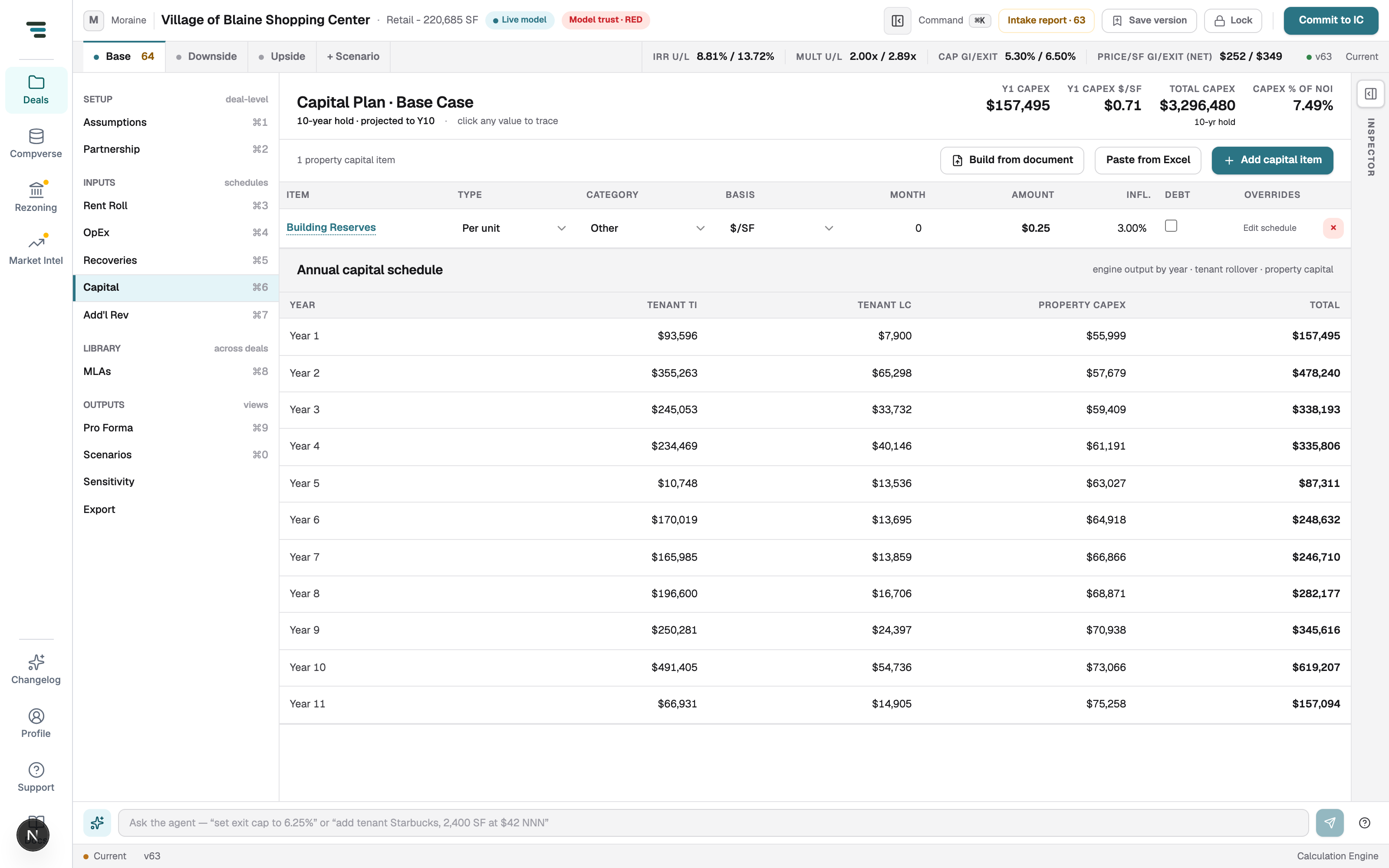
Capital (⌘6) has two parts: the property capital items you edit, and the annual schedule the engine computes — which also includes the tenant TI/LC that rollover and lease-up generate. You budget reserves here; leasing capital comes from the leases.
Edit capital items
Section titled “Edit capital items”Each item: name, Type (per unit, one-time…), Category, Basis ($/SF…), start Month, Amount, inflation, an optional Debt funding flag, and per-year Overrides via Edit schedule.
- + Add capital item — a new row.
- Build from document — extract a capital budget from an uploaded document.
- Paste from Excel — paste a schedule straight in.
Read the schedule
Section titled “Read the schedule”The Annual capital schedule is engine output: Tenant TI, Tenant LC, Property Capex, Total, per year of the hold. TI/LC columns change when you change leases, MLAs, or lease-up — not here.